> ## Documentation Index
> Fetch the complete documentation index at: https://growthx-changeset-release-main.mintlify.site/llms.txt
> Use this file to discover all available pages before exploring further.
# Zapier SDK
> Call Zapier-managed app connections from inside Output steps — no OAuth plumbing, full traces, automatic retries.
Output workflows can invoke any app a user has authorized in their Zapier account without writing OAuth or refresh-token code. The Zapier SDK resolves the user's existing connection and exposes typed actions; Output wraps each call in a `step()` so it's traced, retried, and safe to replay.
## What it enables
* Access hundreds of third-party apps (Slack, Gmail, Airtable, HubSpot, …) through a single SDK.
* Zero OAuth code — Zapier injects tokens from the user's stored connection.
* Two ways to execute actions: a unified `runAction()` entry point, or dot notation to access app-specific methods.
* Machine credentials that run from a headless worker, not a browser.
## When to use
* You need to send, read, or update data in an app a user has already authorized in Zapier.
* You want to skip managing OAuth tokens and refresh flows yourself.
* Your workflow should tolerate transient 5xxs and retry without double-posting.
* You need the Zapier call traced alongside LLM and other steps in the same Output execution.
## Install & authenticate
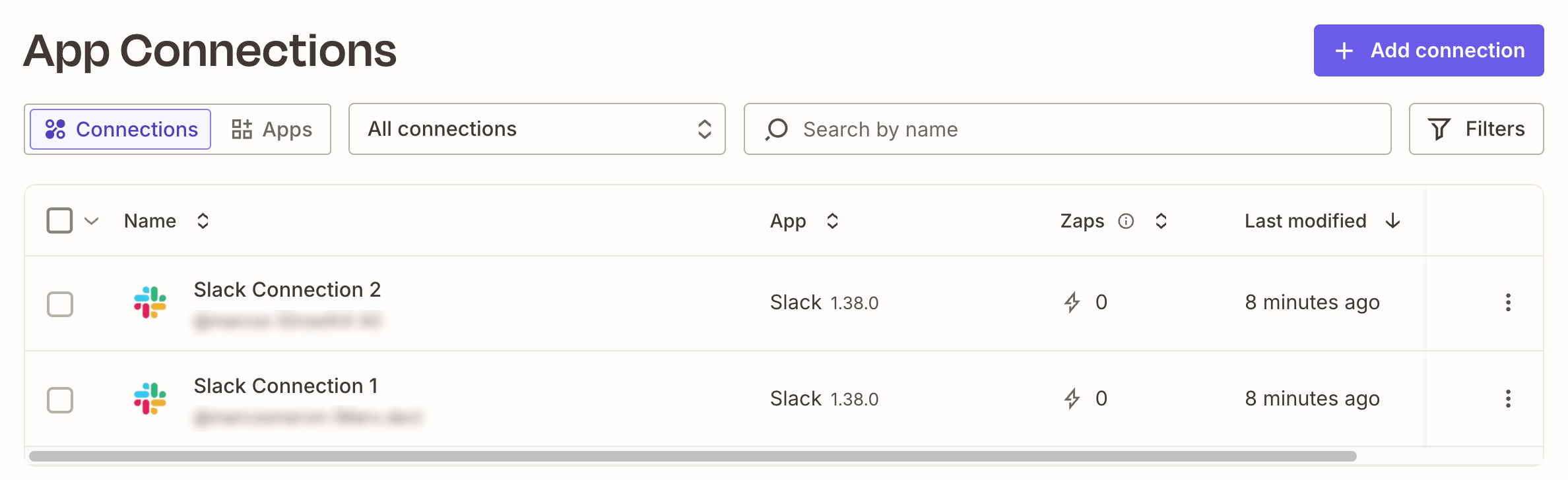
Visit [https://zapier.com/app/assets/connections](https://zapier.com/app/assets/connections) and create connections to the apps you want to use.
 Then install the Zapier SDK:
```bash theme={null}
npm install @zapier/zapier-sdk
npm install -D @zapier/zapier-sdk-cli @types/node typescript
```
Your `package.json` must set `"type": "module"` — both SDKs are ESM.
Authenticate once locally and register the apps you want to call:
```bash theme={null}
npx zapier-sdk login # one-time browser OAuth
npx zapier-sdk add slack # writes .zapier-manifest.json
```
Adding an app installs a typed system, so you can access it through dot notation with typed return values.
## Machine credentials for the worker
The Output worker runs in Docker with no browser. Create machine credentials and store them in Output's encrypted credential store:
```bash theme={null}
npx zapier-sdk create-client-credentials output-ai
npx output credentials edit
```
```credentials.key theme={null}
zapier:
client_id: zap_cc_xxxxxxxx
client_secret: zap_cs_xxxxxxxx
```
You also need to update your `.env`:
```.env theme={null}
# Zapier credentials
ZAPIER_CLIENT_ID=credential:zapier.client_id
ZAPIER_CLIENT_SECRET=credential:zapier.client_secret
```
## Shared Zapier client
Put the configured SDK in its own file under `src/clients/` so every step imports the same instance — matching the API client pattern used elsewhere in Output (e.g. `src/clients/jina.ts`):
```ts src/clients/zapier.ts theme={null}
import { credentials } from '@outputai/credentials';
import { createZapierSdk } from '@zapier/zapier-sdk';
const clientId = credentials.require('zapier.client_id') as string;
const clientSecret = credentials.require('zapier.client_secret') as string;
export const zapier = createZapierSdk({
credentials: { clientId, clientSecret },
});
```
## Schemas
Define every step and workflow boundary in `types.ts` so the same shapes are reused across files instead of being inlined into each `z.object(...)`:
```ts types.ts theme={null}
import { z } from '@outputai/core';
export const WorkflowInputSchema = z.object({
topic: z.string(),
channel: z.string(),
});
export const WorkflowOutputSchema = z.object({
message: z.string(),
channel: z.string(),
ts: z.string(),
});
export const PostToSlackInput = z.object({
channel: z.string(),
message: z.string(),
});
export const DraftAnnouncementInput = z.object({
topic: z.string(),
});
export const DraftAnnouncementOutput = z.object({
message: z.string(),
});
export type WorkflowInput = z.infer;
export type WorkflowOutput = z.infer;
export type PostToSlackInput = z.infer;
export type DraftAnnouncementInput = z.infer;
export type DraftAnnouncementOutput = z.infer;
```
## Calling a Zapier action from a step
Each authorized app shows up on the **App Connections** page in Zapier — that's what `findFirstConnection` queries under the hood:
Put every Zapier call inside a `step()` so it's traced and retried. Resolve the user's connection, then invoke the action through the typed dot-notation API:
```ts steps.ts theme={null}
import { step, FatalError } from '@outputai/core';
import { generateText } from '@outputai/llm';
import { zapier } from '../../clients/zapier.js';
import {
DraftAnnouncementInput,
DraftAnnouncementOutput,
PostToSlackInput,
WorkflowOutputSchema,
} from './types.js';
export const postToSlackChannel = step( {
name: 'post_to_slack_channel',
description: 'Post message to Slack Channel',
inputSchema: PostToSlackInput,
outputSchema: WorkflowOutputSchema,
fn: async ({ channel, message }) => {
const { data: firstSlackConnection } = await zapier.findFirstConnection({
search: 'Slack Connection 2', // if you have more than one app it's better to provide the complete name
appKey: 'slack',
owner: 'me',
isExpired: false,
});
if (!firstSlackConnection) {
throw new FatalError(
'No authorized Slack connection. Authorize Slack in Zapier, then retry.'
);
}
const slack = zapier.apps.slack({ connection: firstSlackConnection.id });
const { data } = await slack.write.direct_message({
inputs: { channel, text: message, as_bot: false }
});
const [result] = data as Array<{ ts: string; channel: string }>;
return { ts: result.ts, channel: result.channel, message: message };
},
});
export const draftAnnouncement = step({
name: 'draft_announcement',
description: 'Draft a Slack announcement message for a given topic',
inputSchema: DraftAnnouncementInput,
outputSchema: DraftAnnouncementOutput,
fn: async ({ topic }) => {
const { text } = await generateText({
prompt: 'draft_announcement',
variables: { topic },
});
return { message: text.trim() };
},
});
```
Write the prompt to generate the message:
```draft_announcement.prompt theme={null}
---
provider: anthropic
model: claude-sonnet-4-6
temperature: 0.7
---
You are a concise, friendly internal communications writer. You draft short Slack
announcements (1–3 sentences) that are clear, warm, and skimmable. Use plain
language, no buzzwords, and no hashtags. End with a single celebratory emoji
when appropriate.
Draft a Slack announcement for the team about the following topic:
{{ topic }}
Return only the message text — no preamble, no quotation marks.
```
A missing connection throws `FatalError` — retrying won't help until the user authorizes Slack in Zapier. Transient 5xxs from Slack or Zapier bubble up and Output's step retry policy handles them automatically.
### Other methods to call Zapier Actions
You can also invoke the action using this syntax:
```ts theme={null}
const { data } = await zapier.runAction( {
appKey: 'slack',
actionType: 'write',
actionKey: 'send_channel_message',
connectionId: firstSlackConnection.id,
inputs: { channel, text: message },
} );
```
Always destructure `{ data }` from the response — the Zapier SDK returns a wrapped envelope.
For endpoints with no built-in action, fall back to `zapier.fetch()` — it injects the user's credentials and returns a standard `Response`:
```ts theme={null}
const response = await zapier.fetch('https://slack.com/api/users.list', {
method: 'GET',
connectionId: firstSlackConnection.id,
});
const users = await response.json();
```
Direct API calls bypass your org's action restriction policies. See [Zapier's docs](https://docs.zapier.com/sdk/quickstart#step-8-make-custom-api-calls-with-fetch-optional).
## Orchestrating with a workflow
Keep the workflow pure — it only sequences step calls. No SDK clients, no `fetch`, no `Date.now`:
```ts workflow.ts theme={null}
import { workflow } from '@outputai/core';
import { draftAnnouncement, postToSlackChannel } from './steps.js';
import { WorkflowInputSchema, WorkflowOutputSchema } from './types.js';
export default workflow({
name: 'slack_broadcast',
inputSchema: WorkflowInputSchema,
outputSchema: WorkflowOutputSchema,
fn: async ({ topic, channel }) => {
const { message } = await draftAnnouncement({ topic });
const { ts } = await postToSlackChannel({ channel, message });
return { message, channel, ts };
},
});
```
Define a scenario file so runs are reproducible and reviewable in PRs:
```json src/workflows/slack_broadcast/scenarios/happy_message.json theme={null}
{
"topic": "we shipped v1.2",
"channel": "#test-zapier-sdk"
}
```
Run the workflow against that scenario:
```bash theme={null}
npx output workflow run slack_broadcast happy_message
```
The Output trace captures each step independently, including the full Zapier request and response inside `postToSlackChannel`.
Then install the Zapier SDK:
```bash theme={null}
npm install @zapier/zapier-sdk
npm install -D @zapier/zapier-sdk-cli @types/node typescript
```
Your `package.json` must set `"type": "module"` — both SDKs are ESM.
Authenticate once locally and register the apps you want to call:
```bash theme={null}
npx zapier-sdk login # one-time browser OAuth
npx zapier-sdk add slack # writes .zapier-manifest.json
```
Adding an app installs a typed system, so you can access it through dot notation with typed return values.
## Machine credentials for the worker
The Output worker runs in Docker with no browser. Create machine credentials and store them in Output's encrypted credential store:
```bash theme={null}
npx zapier-sdk create-client-credentials output-ai
npx output credentials edit
```
```credentials.key theme={null}
zapier:
client_id: zap_cc_xxxxxxxx
client_secret: zap_cs_xxxxxxxx
```
You also need to update your `.env`:
```.env theme={null}
# Zapier credentials
ZAPIER_CLIENT_ID=credential:zapier.client_id
ZAPIER_CLIENT_SECRET=credential:zapier.client_secret
```
## Shared Zapier client
Put the configured SDK in its own file under `src/clients/` so every step imports the same instance — matching the API client pattern used elsewhere in Output (e.g. `src/clients/jina.ts`):
```ts src/clients/zapier.ts theme={null}
import { credentials } from '@outputai/credentials';
import { createZapierSdk } from '@zapier/zapier-sdk';
const clientId = credentials.require('zapier.client_id') as string;
const clientSecret = credentials.require('zapier.client_secret') as string;
export const zapier = createZapierSdk({
credentials: { clientId, clientSecret },
});
```
## Schemas
Define every step and workflow boundary in `types.ts` so the same shapes are reused across files instead of being inlined into each `z.object(...)`:
```ts types.ts theme={null}
import { z } from '@outputai/core';
export const WorkflowInputSchema = z.object({
topic: z.string(),
channel: z.string(),
});
export const WorkflowOutputSchema = z.object({
message: z.string(),
channel: z.string(),
ts: z.string(),
});
export const PostToSlackInput = z.object({
channel: z.string(),
message: z.string(),
});
export const DraftAnnouncementInput = z.object({
topic: z.string(),
});
export const DraftAnnouncementOutput = z.object({
message: z.string(),
});
export type WorkflowInput = z.infer;
export type WorkflowOutput = z.infer;
export type PostToSlackInput = z.infer;
export type DraftAnnouncementInput = z.infer;
export type DraftAnnouncementOutput = z.infer;
```
## Calling a Zapier action from a step
Each authorized app shows up on the **App Connections** page in Zapier — that's what `findFirstConnection` queries under the hood:
Put every Zapier call inside a `step()` so it's traced and retried. Resolve the user's connection, then invoke the action through the typed dot-notation API:
```ts steps.ts theme={null}
import { step, FatalError } from '@outputai/core';
import { generateText } from '@outputai/llm';
import { zapier } from '../../clients/zapier.js';
import {
DraftAnnouncementInput,
DraftAnnouncementOutput,
PostToSlackInput,
WorkflowOutputSchema,
} from './types.js';
export const postToSlackChannel = step( {
name: 'post_to_slack_channel',
description: 'Post message to Slack Channel',
inputSchema: PostToSlackInput,
outputSchema: WorkflowOutputSchema,
fn: async ({ channel, message }) => {
const { data: firstSlackConnection } = await zapier.findFirstConnection({
search: 'Slack Connection 2', // if you have more than one app it's better to provide the complete name
appKey: 'slack',
owner: 'me',
isExpired: false,
});
if (!firstSlackConnection) {
throw new FatalError(
'No authorized Slack connection. Authorize Slack in Zapier, then retry.'
);
}
const slack = zapier.apps.slack({ connection: firstSlackConnection.id });
const { data } = await slack.write.direct_message({
inputs: { channel, text: message, as_bot: false }
});
const [result] = data as Array<{ ts: string; channel: string }>;
return { ts: result.ts, channel: result.channel, message: message };
},
});
export const draftAnnouncement = step({
name: 'draft_announcement',
description: 'Draft a Slack announcement message for a given topic',
inputSchema: DraftAnnouncementInput,
outputSchema: DraftAnnouncementOutput,
fn: async ({ topic }) => {
const { text } = await generateText({
prompt: 'draft_announcement',
variables: { topic },
});
return { message: text.trim() };
},
});
```
Write the prompt to generate the message:
```draft_announcement.prompt theme={null}
---
provider: anthropic
model: claude-sonnet-4-6
temperature: 0.7
---
You are a concise, friendly internal communications writer. You draft short Slack
announcements (1–3 sentences) that are clear, warm, and skimmable. Use plain
language, no buzzwords, and no hashtags. End with a single celebratory emoji
when appropriate.
Draft a Slack announcement for the team about the following topic:
{{ topic }}
Return only the message text — no preamble, no quotation marks.
```
A missing connection throws `FatalError` — retrying won't help until the user authorizes Slack in Zapier. Transient 5xxs from Slack or Zapier bubble up and Output's step retry policy handles them automatically.
### Other methods to call Zapier Actions
You can also invoke the action using this syntax:
```ts theme={null}
const { data } = await zapier.runAction( {
appKey: 'slack',
actionType: 'write',
actionKey: 'send_channel_message',
connectionId: firstSlackConnection.id,
inputs: { channel, text: message },
} );
```
Always destructure `{ data }` from the response — the Zapier SDK returns a wrapped envelope.
For endpoints with no built-in action, fall back to `zapier.fetch()` — it injects the user's credentials and returns a standard `Response`:
```ts theme={null}
const response = await zapier.fetch('https://slack.com/api/users.list', {
method: 'GET',
connectionId: firstSlackConnection.id,
});
const users = await response.json();
```
Direct API calls bypass your org's action restriction policies. See [Zapier's docs](https://docs.zapier.com/sdk/quickstart#step-8-make-custom-api-calls-with-fetch-optional).
## Orchestrating with a workflow
Keep the workflow pure — it only sequences step calls. No SDK clients, no `fetch`, no `Date.now`:
```ts workflow.ts theme={null}
import { workflow } from '@outputai/core';
import { draftAnnouncement, postToSlackChannel } from './steps.js';
import { WorkflowInputSchema, WorkflowOutputSchema } from './types.js';
export default workflow({
name: 'slack_broadcast',
inputSchema: WorkflowInputSchema,
outputSchema: WorkflowOutputSchema,
fn: async ({ topic, channel }) => {
const { message } = await draftAnnouncement({ topic });
const { ts } = await postToSlackChannel({ channel, message });
return { message, channel, ts };
},
});
```
Define a scenario file so runs are reproducible and reviewable in PRs:
```json src/workflows/slack_broadcast/scenarios/happy_message.json theme={null}
{
"topic": "we shipped v1.2",
"channel": "#test-zapier-sdk"
}
```
Run the workflow against that scenario:
```bash theme={null}
npx output workflow run slack_broadcast happy_message
```
The Output trace captures each step independently, including the full Zapier request and response inside `postToSlackChannel`.